
Best Power Banks for Digital Nomads (2026 Guide)
As an Amazon Associate I earn from qualifying purchases. Some links on this page earn us a small commission, at no extra cost to you. Full disclosure.
Quick answer
For most nomads the Anker 737 PowerCore 24K is the pick of the best power banks for digital nomads: fast enough to charge a laptop, big enough capacity. Charging phones only? The Anker 622 MagGo is tiny and magnetic. Want to see exactly what is happening? The Shargeek 300 has a full display.
Checked on 5 October 2026: Anker 737 specs on anker.com (24,000mAh, 140W max, 630 g, two USB-C ports and one USB-A) and the airline battery rules from the US FAA.
Our top picks
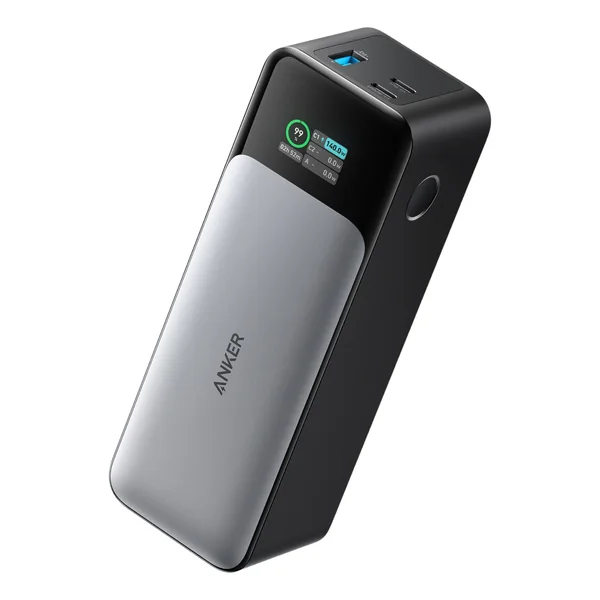
Anker 737 PowerCore 24K
Best Overall Power Bank for Nomads Read more
Key takeaways
- For most nomads the Anker 737 PowerCore 24K is the pick: fast enough to charge a laptop, with big enough capacity.
- Charging phones only? The Anker 622 MagGo is tiny and magnetic.
- Want to see exactly what is happening? The Shargeek 300 has a full display.
- Power banks must stay in carry-on luggage, never in checked baggage.
- If you are serious about nomad work, you need at least two power banks.
Choosing between two brands for a slim phone power bank? See our Baseus vs Anker power bank comparison, with both brands' recalls and the flight rules. For two popular 20,000 mAh banks with built-in cables, see our Anker vs Belkin power bank comparison.
Quick Comparison Table
| Power bank | Capacity | Output | Weight | Shop |
|---|---|---|---|---|
| 140W | 630g | Get yours on Amazon | |
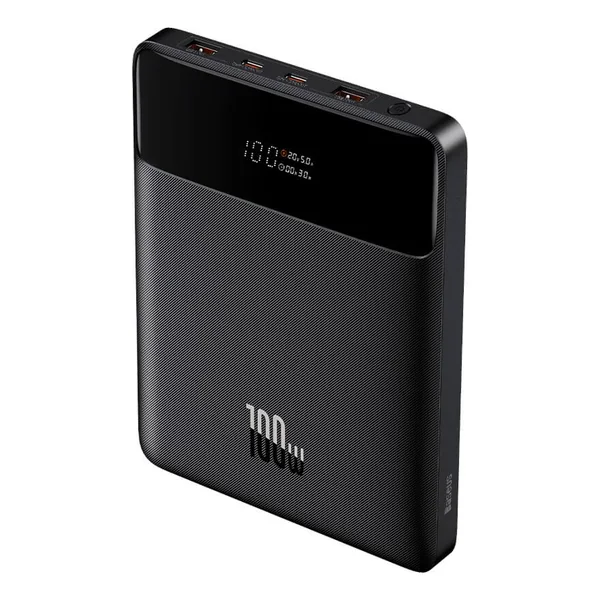 | 100W | 330g | Get yours on Amazon | |
| 5,000mAh | 7.5W | 150g | Get yours on Amazon | |
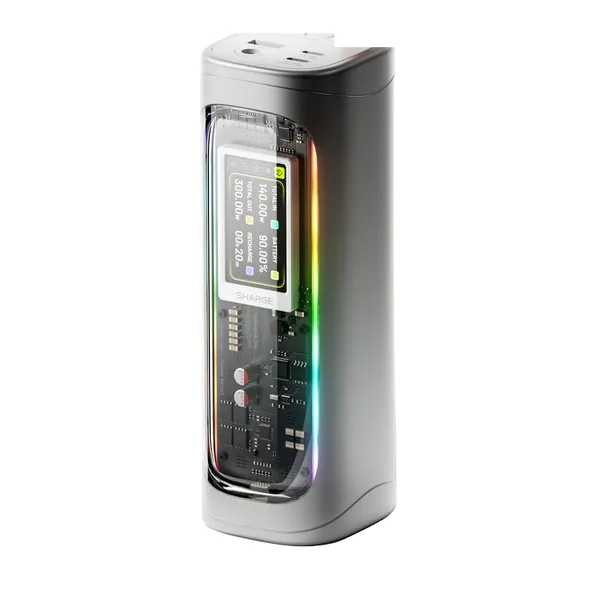 | 300W | 750g | Get yours on Amazon | |
| 25,000mAh | 145W | 650g | Get yours on Amazon |
The Top 5 Power Banks for Digital Nomads
Anker 737 PowerCore 24K
Anker 737 PowerCore 24K
What we like
- Fast 140W laptop charging
- Charges 3 devices simultaneously
- Real-time digital display
- Excellent build quality
- Multiple USB-C ports
What could be better
- Heaviest option on this list
- Slightly warm during intense use
- Larger size (less pocket-friendly)
- Mid-range price point
Best for: Best Overall Power Bank for Nomads
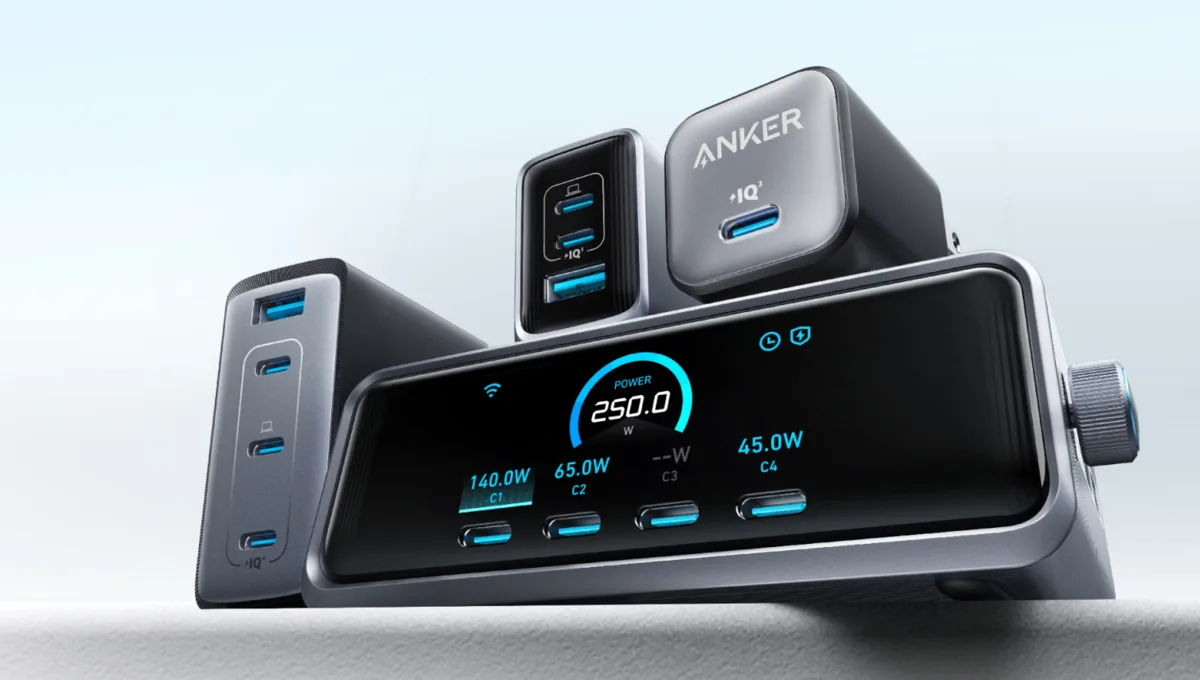
The Anker 737 is the all-round pick. With 140W output (USB PD 3.1), it can charge a MacBook Pro at close to full speed, as long as your cable and laptop support it. The build quality feels premium. It's heavier than some alternatives (630 g), but the weight means serious capacity. The three ports (2x USB-C, 1x USB-A) charge a laptop and phone at the same time. The real-time display shows remaining capacity percentage, which is incredibly useful when planning your day offline. One minor complaint: it does get slightly warm during heavy use, but nothing concerning.
Specifications
| Specification | Value |
|---|---|
| Capacity | 24,000mAh |
| Output | 140W max total |
| Weight | 630g |
| Ports | USB-C (2), USB-A (1) |
| Price | Check price on Amazon |
Pros & Cons
Pros
Cons
Baseus Blade 100W
Baseus Blade 100W
What we like
- Affordable
- 100W fast charging
- Slim travel-friendly design
- Good cable management
- Strong value proposition
What could be better
- Slower than 140W alternatives
- No display screen
- Less premium feel than Anker
- Smaller capacity (20K vs 24K)
Best for: Best for Laptop Charging on a Budget
If budget is a concern but you still need serious laptop charging power, the Baseus Blade absolutely delivers. For everyday nomad use it covers most of what pricier power banks do. The slim profile fits in most backpack side pockets without adding bulk, which is huge when you're trying to pack light. The 100W output isn't quite flagship-level, but it's more than enough to charge a MacBook at reasonable speeds. The cable management is thoughtful, there's a design consideration for wire routing that sounds trivial but actually matters when you're juggling multiple cables.
Specifications
| Specification | Value |
|---|---|
| Capacity | 20,000mAh |
| Output | 100W |
| Weight | 330g |
| Ports | USB-C (2), USB-A (1) |
| Price | Check price on Amazon |
Pros & Cons
Pros
Cons
Anker 622 MagGo
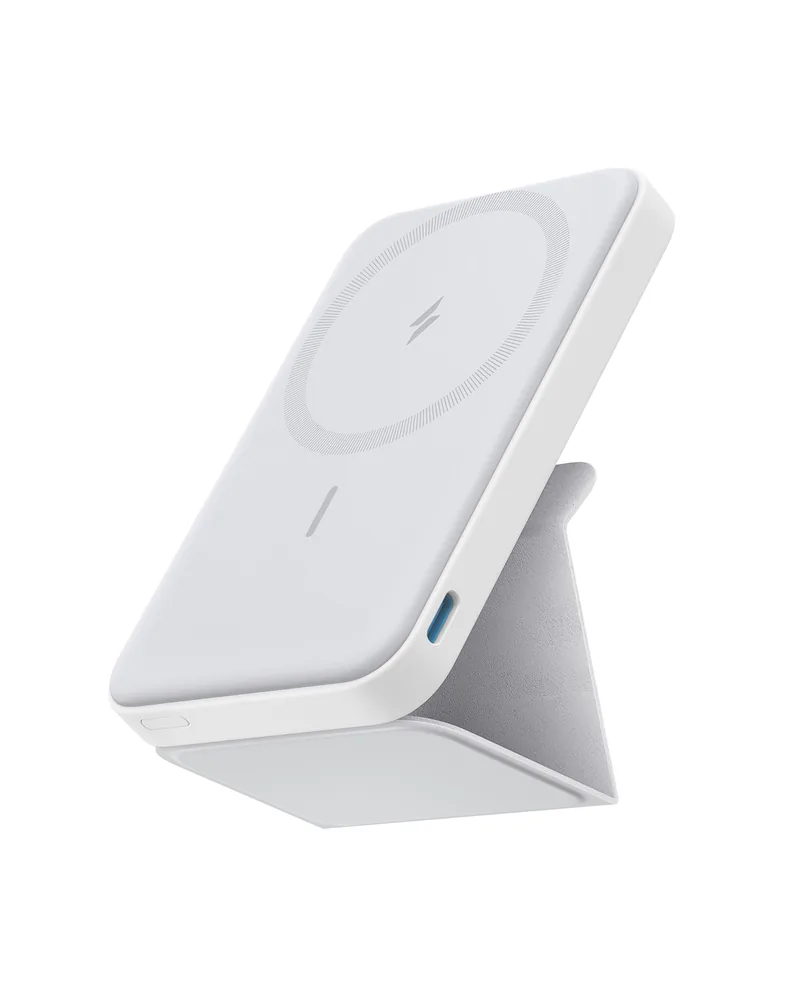
Anker 622 MagGo
What we like
- Ultralight (150g)
- Magnetic MagSafe design
- Minimal aesthetic
- Budget-friendly
- Perfect secondary device
What could be better
- Phone-only charging
- Small capacity
- Low output
- Not suitable for laptops
Best for: Best for Phones (Ultra-Lightweight)
Sometimes you don't need a laptop power bank. The Anker 622 MagGo is light enough to forget. The magnetic design snaps to the back of a MagSafe iPhone, so you have a backup battery without a cable. Here's the honest truth: this won't charge your laptop, and at 5,000mAh, it's sized for phones only. Expect roughly one phone charge, and note that wireless charging is limited to 7.5W. The minimalist design feels premium, and the MagSafe compatibility is perfect if you're already in Apple's ecosystem. Perfect as a secondary power bank to carry on day trips when you don't need the heavy hitter.

Specifications
| Specification | Value |
|---|---|
| Capacity | 5,000mAh |
| Output | 7.5W wireless |
| Weight | 150g |
| Ports | USB-C (1) |
| Price | Check price on Amazon |
Pros & Cons
Pros
Cons
Shargeek 300
Shargeek 300
What we like
- Smart display with real-time power, temperature and battery data
- 300W total output, 140W on each USB-C port
- DC port as well as USB-C and USB-A
- 24,000mAh capacity (88.8Wh per Sharge)
- Transparent case with RGB lighting
What could be better
- Heavier than the Anker 737 (750 g vs 630 g)
- Display and settings add complexity
- Costs more than the Anker 737
Best for: Best Display and Real-Time Monitoring
The Shargeek 300's best feature isn't its capacity, it's the smart display that shows real-time power, temperature and battery data through a transparent window in the case. You can see how much power a laptop is drawing and how the bank is holding up. It is built for power users: Sharge lists 300W total output, with 140W from each of the two USB-C ports, plus a DC port and a USB-A port. Compared to the Anker 737, it has the same 24,000mAh headline capacity and a higher total output, but it is heavier (750 g against 630 g) and costs more. If you like data and real-time monitoring, that is the trade. It's the power bank for the power user.
Specifications
| Specification | Value |
|---|---|
| Capacity | 24,000mAh |
| Output | 300W total |
| Weight | 750g |
| Ports | USB-C (2), USB-A (1), DC (1) |
| Price | Check price on Amazon |
Pros & Cons
Pros
Cons
Ugreen 145W Power Bank
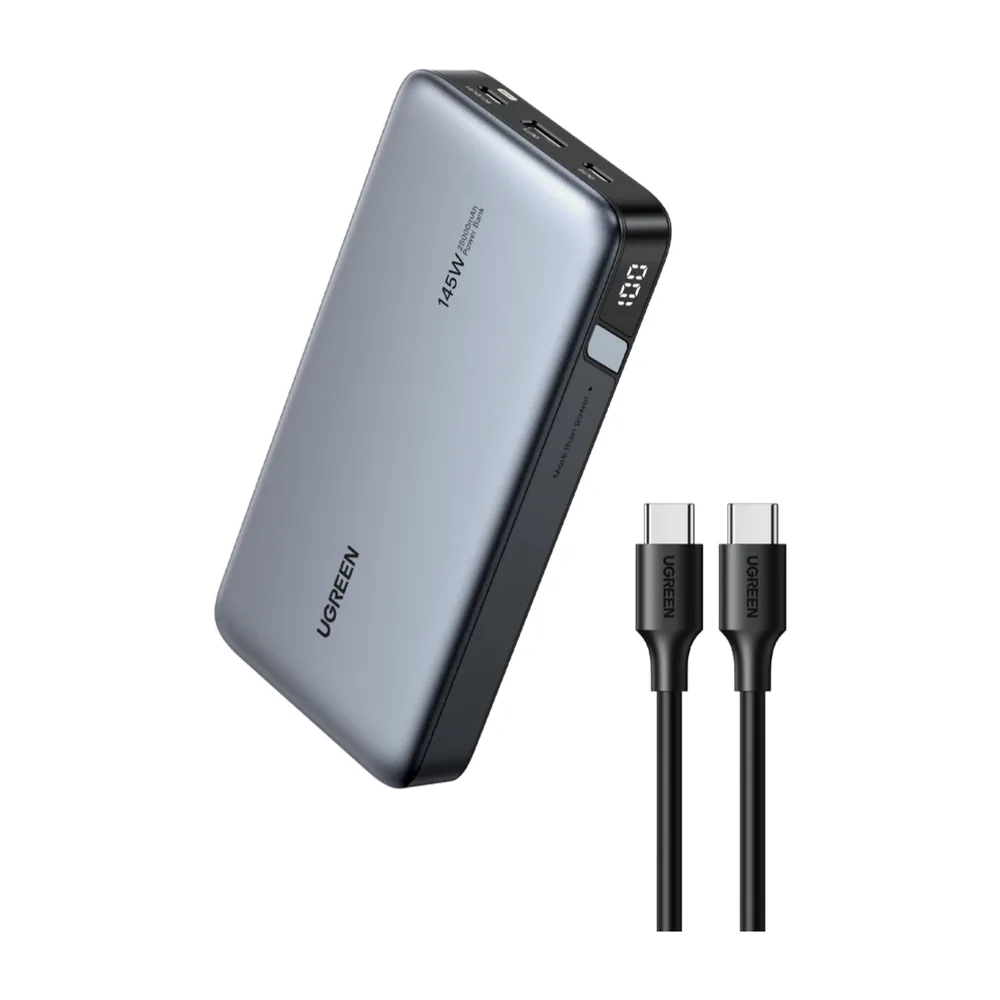
Ugreen 145W Power Bank
What we like
- Highest power output (145W)
- 25,000mAh capacity
- Charges multiple devices fast
- Best for extended trips
- Competitive pricing
What could be better
- Heaviest on the list (650g)
- Largest size
- Not ideal for minimalist packing
- Overkill for casual nomads
Best for: Best for High-Capacity Charging
The Ugreen 145W is the specialist: the highest output in this list. If you're charging a large laptop, multiple devices, or working from places with limited outlet access all day, this is the answer. The 145W output is the highest in this list, meaning you're getting legitimate, fast laptop charging even when powering other devices simultaneously. The trade-off is weight (650g) and size. This isn't a casual grab-and-go power bank, it's purpose-built for extended work sessions without access to power outlets. The build is solid, though it's the bulkiest option here. For nomads with lighter travel styles, this might be overkill. For those doing serious, extended remote work in developing countries or rural areas, it's genuinely transformative. Want it against Anker's 25,000 mAh bank? See Anker vs UGREEN power bank.
Specifications
| Specification | Value |
|---|---|
| Capacity | 25,000mAh |
| Output | 145W |
| Weight | 650g |
| Ports | USB-C (2), USB-A (1) |
| Price | Check price on Amazon |
Pros & Cons
Pros
Cons
Power Bank Rules for Flying: What You Actually Need to Know
TSA regulations are the invisible force shaping which power banks you can actually use while traveling. The key rule: power banks must stay in carry-on luggage, never in checked baggage. The reason? Lithium batteries are technically dangerous in unpressurized cargo holds (though statistically safer than you'd think). Most power banks under 100Wh are allowed; anything above 160Wh is prohibited. The 24,000mAh to 25,000mAh power banks on this list are roughly 86 to 95Wh, so they fall under the 100Wh limit, but airlines can set stricter rules, so check yours. One pro tip: Charge your power bank before heading to the airport.
| Battery size | Carry-on | Checked bag |
|---|---|---|
| Up to 100Wh | Allowed, no airline approval needed | Not allowed |
| 101 to 160Wh | Up to two spares, with airline approval | Not allowed |
| Over 160Wh | Not allowed on passenger aircraft | Not allowed |
Source: FAA PackSafe guidance on lithium batteries, read on 5 October 2026. Airlines can set stricter limits, so check yours. Wh = volts x amp hours.
Our remote work setup
The gear guides we compare for working from cafes, coliving rooms and rentals:

Frequently Asked Questions
Can I bring a power bank on an airplane?
Yes, power banks under 100Wh are allowed in carry-on luggage in most countries. The power banks on this list (24,000-25,000mAh) typically fall between about 86 and 95Wh, making them airline-compliant. However, they must never go in checked baggage. Always verify with your specific airline before travel.
How do I know what wattage I actually need?
Phone charging typically requires 10-20W. Most laptops need 45-100W for meaningful charging. If you want to charge a laptop while also powering a phone or tablet, look for at least 65W. The Anker 737's 140W is premium, but 100W is sufficient for most nomads.
Which power bank is best if I travel very light?
The Anker 622 MagGo at 150g is your absolute lightest option, but it's phone-only. If you need laptop capability with minimal weight, the Baseus Blade (330g) is the best compromise. It delivers serious charging power without excessive bulk.
Do power banks degrade if I don't use them regularly?
Lithium batteries do slowly lose capacity over time, even unused. Topping them up every month or so helps battery health. All these models have at least a two-year warranty, so if degradation becomes problematic, you have recourse. Most last 3-4 years of regular travel use.
Why shouldn't I buy the cheapest power bank available?
Cheap no-name power banks often deliver far less than their advertised capacity. You're essentially buying a ticking time bomb, one that might overheat or fail mid-trip. These five options represent genuine value because they're tested, reliable, and won't fail during a critical work moment.
How many power banks can I take on a plane?
Carry-on only, says the FAA. Up to 100Wh needs no approval, and up to two spares between 101 and 160Wh need airline approval (FAA PackSafe, read on 5 October 2026). Many airlines are stricter, so check yours.
Final Verdict: Which Power Bank Should You Actually Buy?
Here's the simple recommendation: if you're serious about digital nomad work, you need at least two power banks. The Anker 737 (or Ugreen 145W) as your primary laptop charger, and the Anker 622 MagGo as your lightweight secondary. If that's beyond budget, the Baseus Blade alone covers 80% of your needs at half the price. Power bank selection shouldn't be complicated. You need reliable power delivery, proven build quality, and honest specs. These five options deliver all three. Your future self, the one not panicking in a dimly-lit cafe with a dying laptop, will thank you.
Why this matters
The Coffee Shop Moment
A laptop at 1% in the middle of a client call, with no outlet in sight and a dying phone, is every nomad's nightmare. For digital nomads, a quality power bank isn't a luxury, it's essential infrastructure. Not all power banks are created equal, though. The difference between a mediocre power bank and a great one often comes down to understanding what you actually need: Are you charging just your phone, or do you need to resurrect a dead laptop? How much weight can you reasonably carry? Does airport security accept it? This guide shares the top five picks, and giving you the honest pros and cons of each. By the end, you'll know exactly which power bank deserves a spot in your nomad setup.
Laptop Power Banks vs. Phone Power Banks: What's the Difference?
Not all power banks can charge laptops. This distinction completely changes your buying decision. Phone power banks typically max out at 20W output and use lower capacity batteries (5,000-10,000mAh). They're lightweight and perfect if you're just topping up your phone between work sessions. Laptop power banks, on the other hand, need significantly higher wattage (60W+) and larger capacities (20,000mAh+) to actually meaningful charge a MacBook or laptop. They're heavier and pricier, but they do something genuinely different. The sweet spot for digital nomads? A mid-range power bank that can handle both, charging your phone multiple times while also giving your laptop one meaningful boost when you're in a pinch. It's the difference between being stranded and staying productive. Working from a van or off-grid for days at a time is a different story: a power bank will not keep up, and that is where a portable power station comes in.

Want the full setup in one place? Grab the Free Digital Nomad Setup Guide.
The Nomad Toolkit
Tools We Recommend on the Road
These four cover the boring but essential parts of nomad life. These are the four we recommend first for most nomads:
- SafetyWing, monthly nomad insurance, subscribe once, keeps running as you move country to country
- Airalo, eSIM for 200+ countries, activate before you land, no more SIM card hunting
- Revolut, multi-currency account with real exchange rates, my daily card abroad
- DiscoverCars, best car rental prices worldwide, filter for automatic and unlimited km
Building power into a van? See cargo van conversion for beginners in 5 steps.
Updated:
Affiliate disclosure. This post contains affiliate links. If you click and buy something, this site earns a small commission at no extra cost to you. Picks are based on published specs, independent reviews and manufacturer information, and we only recommend what we would use ourselves. As an Amazon Associate I earn from qualifying purchases. Read the full affiliate disclosure. Amazon and the Amazon logo are trademarks of Amazon.com, Inc. or its affiliates.
Your next step

 See the full setup guide